
Rules include two optional advanced settings which control what happens in specific scenarios. These are found in the Advanced Settings section at the bottom of the rule detail screen, which is revealed by clicking Show advanced settings.
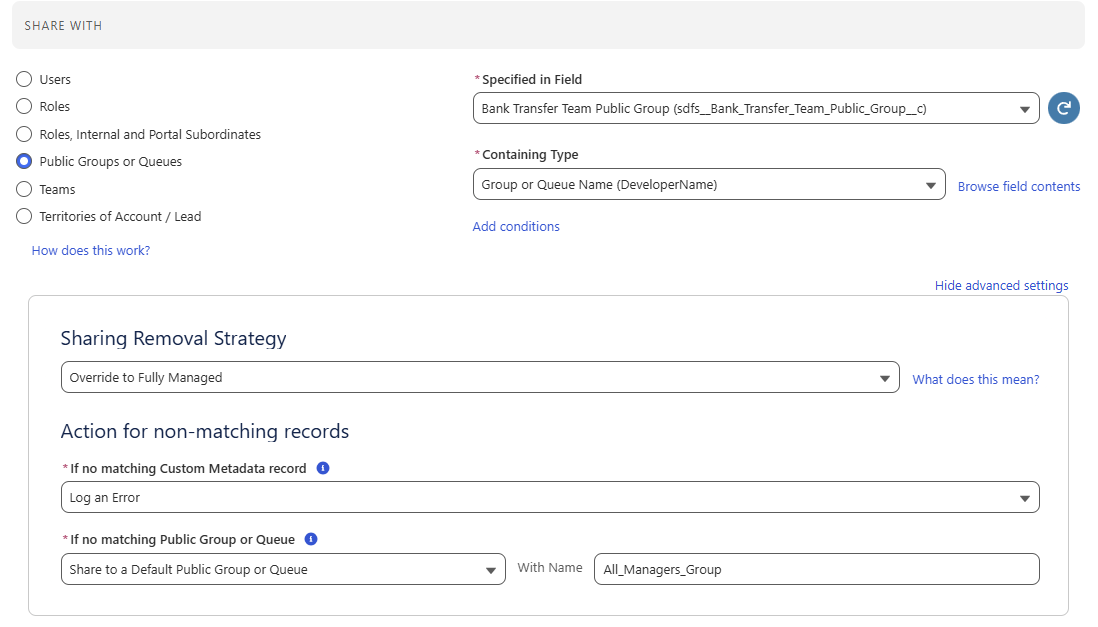
Action for Non-Matching Records
Controls what happens when a sharing field contains a value but no matching user, role or group can be found.
For example, if a rule shares a record with a user whose id is stored in a lookup field, but the user referenced no longer exists, there is no match and this setting determines how FormulaShare handles this.
Options are:
- Log an Error – a FormulaShare Record Log error is created indicating that no match was found. This is the default for new rules and for existing rules created before this option was introduced
- Share to a Default User, Role or Group – specify a fallback entity to receive access whenever no match is found. A second field becomes available to enter the name or id of the default user, role or group
- Take No Action – the record is treated as if the sharing field were unpopulated: no sharing is applied and no error is logged
For Custom Metadata Rules, a match can fail at two independent points: first when identifying the metadata record, and second when resolving the user, role or group named on that record. Each can be configured separately.
Sharing Removal Strategy
Available for custom objects only
The Sharing Removal Strategy is configured at object level in FormulaShare Setup, and determines whether FormulaShare removes sharing which is no longer valid as well as applying new sharing. This rule-level setting allows the object default to be overridden for a specific rule.
Options are:
- Use Object Default – the rule follows the removal strategy configured in Object Settings for this object. This is the default and is pre-selected for all rules
- Override to Fully Managed – FormulaShare will create sharing for this rule and will also remove any sharing applied by this rule which no longer meets the rule criteria, regardless of the object-level setting
- Override to Create Only – FormulaShare will create sharing for this rule but will never remove sharing previously applied by this rule, regardless of the object-level setting
For example, an object may be set to Create Only at object level because most rules on the object accumulate sharing deliberately over time. A specific rule where old sharing should always be cleaned up can be set to Override to Fully Managed so that only that rule removes stale sharing, while all others continue to accumulate.
Because Apex Sharing Reasons allow FormulaShare to distinguish sharing applied by each individual rule on custom objects, the override applies precisely – sharing applied by this rule is managed independently of sharing applied by other rules on the same object.
This setting is not available for standard objects, where Apex Sharing Reasons are not supported and sharing cannot be differentiated by rule.
Related Articles: