
FormulaShare supports sharing records with territories defined in Salesforce's Enterprise Territory Management (ETM) feature. This allows records to be shared automatically with the territory groups associated with a related Account or Lead.
Prerequisites
Territory sharing requires Enterprise Territory Management to be enabled and configured in your org. If ETM is not enabled, the territory sharing options will not appear in the FormulaShare rule setup screen.
How It Works
FormulaShare looks up the territories assigned to the Account or Lead identified by the selected field, then shares the record with the corresponding Salesforce internal sharing groups for each territory. Two group types are supported:
- Territory: Members of the territory itself
- Territory and Subordinates: Members of the territory and all territories below it in the territory hierarchy
The field selected for the rule should contain the Id of an Account or Lead record - typically this would be a lookup field, but a text or formula field work too. FormulaShare uses the ObjectTerritory2Association object to find which territories are assigned to that Account or Lead, then resolves the appropriate sharing group for each territory.
Setting Up a Territory Sharing Rule
First select the object to be shared. If this has a direct lookup to the Account or Lead, there's no need to select a related object. Otherwise, select a related object with a lookup to Account or Lead in the Location of Field Controlling Sharing section of the rule.
Select the Territories of Account / Lead. The example below shows a rule which shares client Account records to the territories associated to supplier Account records associated through an Account Affiliation junction object.
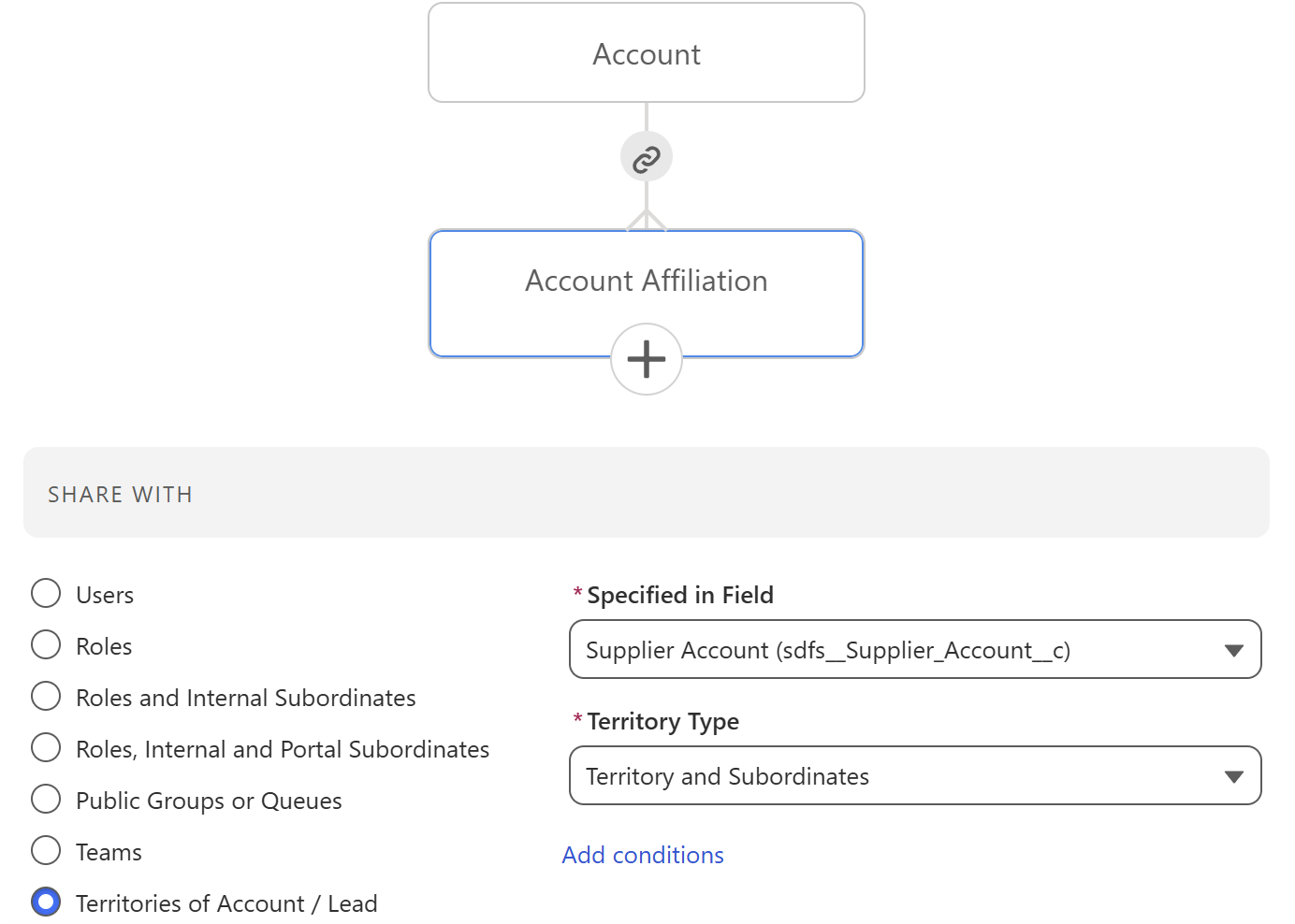
The Specified in Field picker will show fields which contain an Account or Lead Id – either a direct lookup to Account or Lead, or a text/formula field populated with one of these Ids.
The Territory Type dropdown allows selection of sharing options:
- Territories shares with members of the territories directly assigned to the referenced Account or Lead
- Territories and Subordinates shares with members of those territories and all subordinate territories in the hierarchy
Access Level Options
Access level options (Read Only / Read/Write) work the same as for other rule types. For Account records, the additional options to set sharing levels for related contacts, opportunities and cases are also available – see Account Sharing.
When No Territories Are Found
If the referenced Account or Lead has no territories assigned, FormulaShare will either skip sharing or log an error depending on the When field value doesn't match behaviour setting on the rule:
- Do Not Share: No action is taken and no error is logged
- Log Error: An error is recorded in the FormulaShare logs. See Errors and Warnings for details on reviewing these
The same behaviour applies if territories are found but no corresponding sharing group exists for the territory.
Related Articles: