
Filter conditions allow a rule to apply sharing only when records meet specific criteria, rather than sharing every record that matches the rule's lookup or formula field configuration.
For example, you might want to share Opportunities to the field sales team, but only when the Opportunity is at a certain stage – filter conditions make this straightforward to configure without needing a separate formula field.
Filters are also useful for cross-object rules, where they can ensure sharing matches requirements, and in some cases improve performance. Consider a rule which shares Account records to groups identified via related Account Relationship records – without a filter, every relationship record would be checked. A filter on the child Account Relationship records restricting to certain relationship types ensures sharing is granted only where appropriate, and as described in the Performance Considerations section below, reduces the number of relationship records retrieved from the database.
Setting Up Filters
Filters are configured in the Filter Conditions section of the rule detail screen (displayed after clicking the "Add conditions" hyperlink):
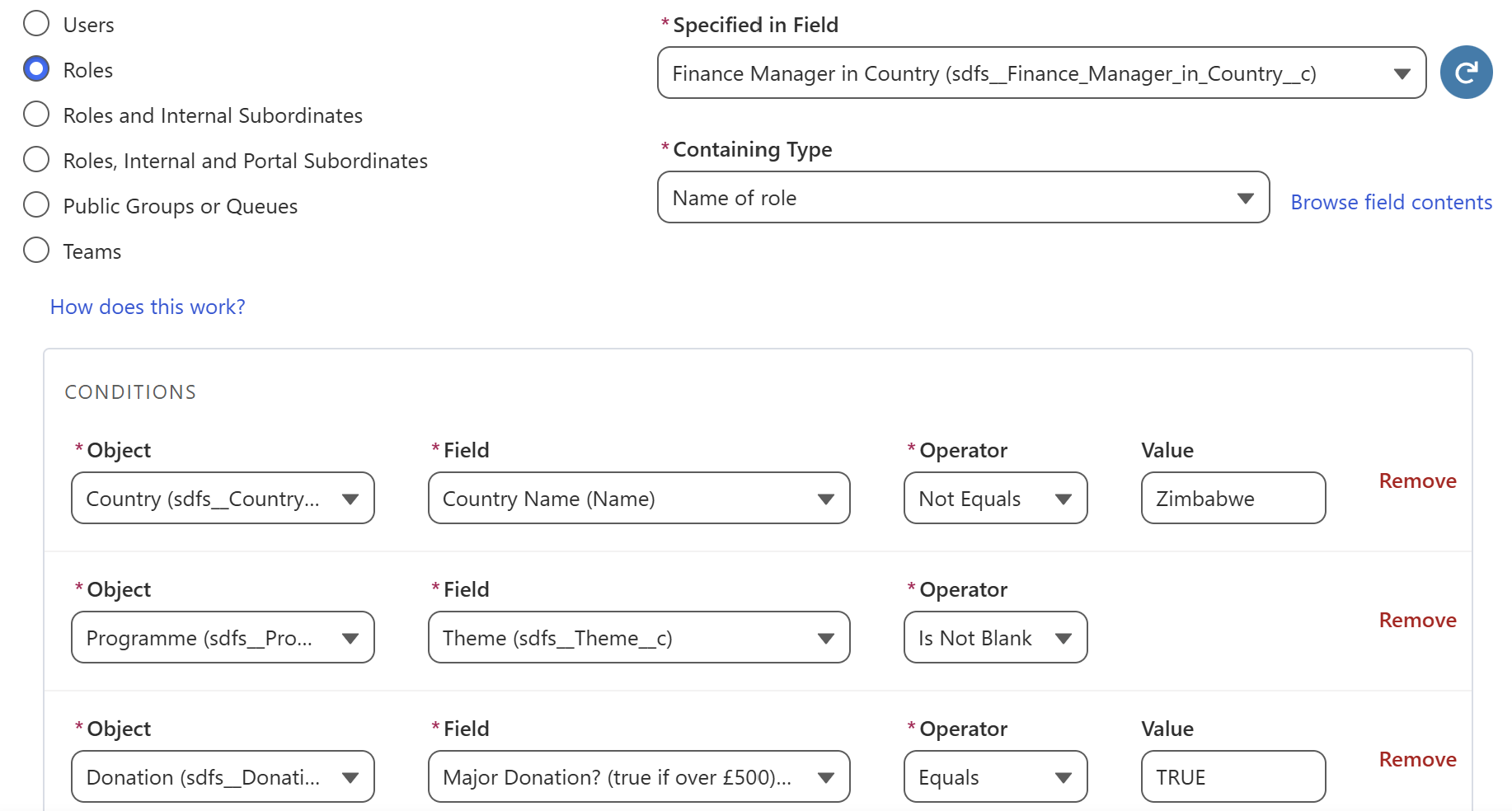
One or more conditions can be added, each specifying:
- Object: The object the condition applies to (for cross-object rules, you can filter on the shared object, the object with the sharing field, or objects in between)
- Field: The field to evaluate
- Operator: One of the following:
- Equals – field value matches the specified value (case-insensitive)
- Not Equals – field value does not match the specified value (case-insensitive)
- Is Blank – field is null or empty
- Is Not Blank – field is populated
Where multiple conditions are defined for the same object, all conditions must be satisfied for sharing to apply (AND logic).
One Filter Per Object
Each rule supports filtering on one field per object involved in the rule. If you need more complex criteria on a given object – for example OR logic, or conditions involving related fields – the recommended approach is to create a formula field on that object which evaluates the criteria, then use an Equals condition against that formula field.
How Filters Are Evaluated
Filter conditions are evaluated during both batch and real-time sharing assessment. At a high level:
- Records are queried from the database
- Filters are evaluated against each record
- Only records which pass all applicable conditions receive sharing
Real-Time Assessment and Trigger Detection
For standard rules, FormulaShare's trigger integration will detect changes to the filter field on the shared object and reassess sharing in real time when that field changes, in the same way it does for the sharing field itself.
For cross-object rules, real-time reassessment follows the same principles described in Cross-Object Rules. For rules where the sharing field is on a child object, changes to the filter field on the shared object will be detected and assessed in real time. Changes to filter fields on other objects in the relationship chain will be applied asynchronously by the next batch or targeted calculation job run.
Performance Considerations
Where Filters Can Improve Performance
For rules where the sharing field is on a child object relative to the shared object, or those where sharing is based on a parent object related to the child, filter conditions defined on the lowest level child object are added to the SOQL query for child and intermediary records as WHERE clause conditions. This means fewer records are retrieved from the database before evaluation begins, which can meaningfully reduce both query time and the volume of in-memory processing – particularly for rules where a large proportion of irrelevant child records would otherwise be retrieved.
For example, consider a rule which shares Accounts to product teams identified on Product records when there are high quantity Opportunity Product records relating to those Accounts. Account is the shared object, Opportunity is an intermediary object, Opportunity Product is the lowest level child and Product is the object with the sharing field. A filter on the Opportunity Product object – for instance a formula which evaluates to true only when quantity is greater than 10 – is pushed into the SOQL query that retrieves Opportunity records, reducing the volume of records fetched before any further evaluation takes place. Filters on Account, Opportunity or Product, by contrast, are evaluated in memory after Opportunity Product records have been retrieved.
Where Filters Are Less Likely to Reduce Database Load
For all other object positions in a rule's relationship chain – including the shared object itself for standard and ancestor rules, and any intermediate or controlling objects for cross-object rules – filter conditions are evaluated in memory after records have been retrieved from the database. In these cases, filters will not reduce the volume of data queried, though they will still correctly restrict which records receive sharing.
In short: filters on child objects in cross-object rules offer the greatest performance benefit; filters on other objects still function correctly but do not reduce query load.
Minimising Impact on Batch Processing
For rules where there could be large numbers of related child records, consider whether a filter can be applied on the child object to reduce the records retrieved. If very selective criteria are needed on objects that can only be evaluated in memory, the advice on large data volumes in related objects remains relevant.
Related Articles: