
Settings which apply to the whole FormulaShare application are controlled in the custom metadata type "FormulaShare Settings".
Overrides are set by creating a record in this custom metadata type. The record should only have values set for the settings which need to be overridden - leave all other fields blank - and the active flag should be set to true.
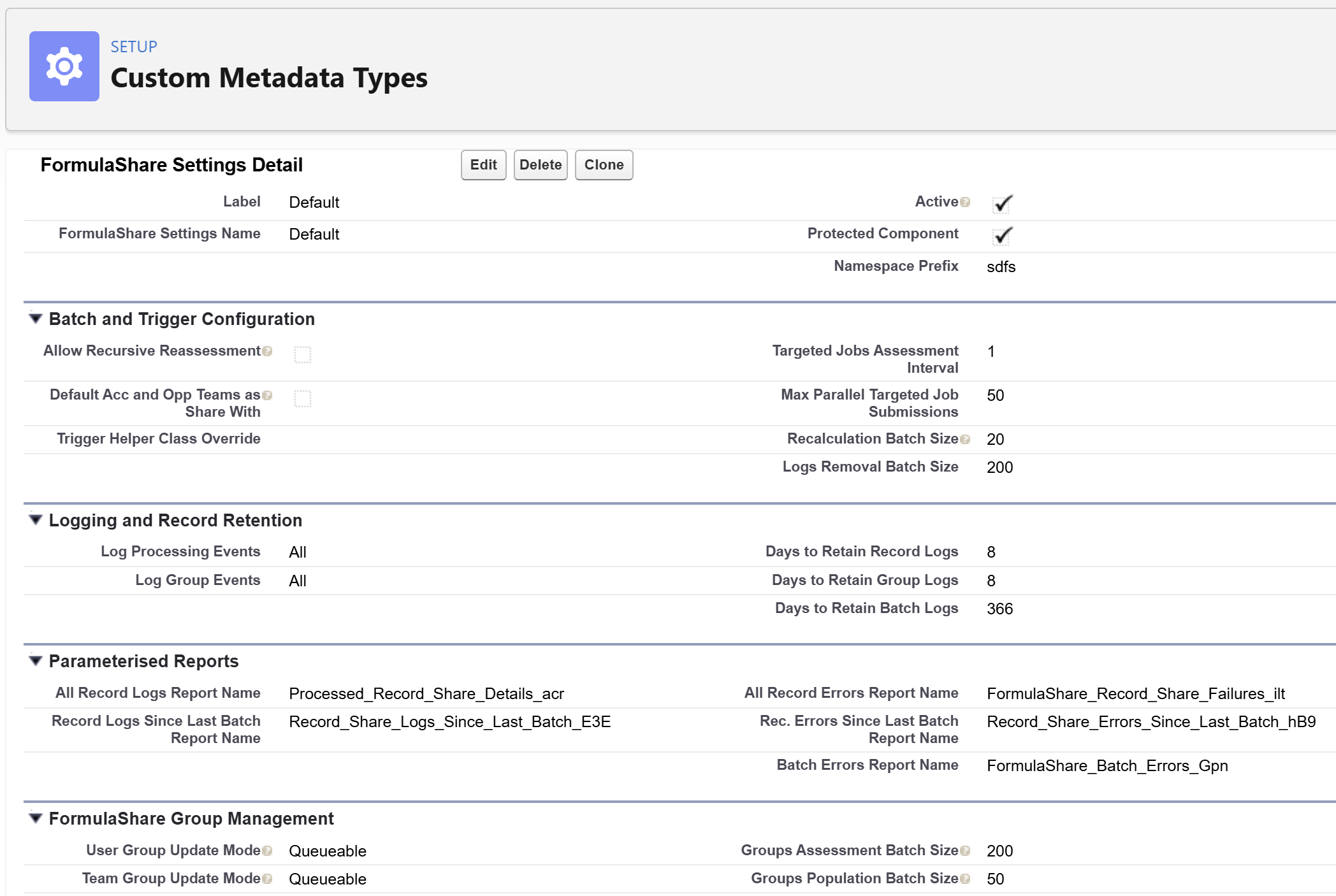
- Name and Label - Can be set to any values
- Active - Must be true for the setting overrides to apply. Ensure you have only one active set of FormulaShare Settings in the org
- Trigger Helper Class Override - Enables an alternative version of the trigger processing class to be called. Set this only if requested by FormulaShare support
- Targeted Jobs Assessment Interval Relevant to FormulaShare Enterprise and Unlimited Only (default 1) - Determines the number of minutes between each assessment of whether there is one or more Targeted Calculation Job which is due to run. Note that the assessment itself has very little system overhead and makes no data changes, so it's recommended for this to run very frequently. Note that if the Targeted Calculation batch isn't scheduled in your org (which will be the case unless this has been configured in FormulaShare Setup), this setting has no effect.
- Max Parallel Targeted Job Submissions Relevant to FormulaShare Enterprise and Unlimited Only (default 50) - The total number of Targeted Calculation Jobs which can be processing, queued or held in the Apex Flex Queue at any given point in time. When this number is reached, any jobs which are due will be delayed and submitted when fewer jobs are queued. This number can be overridden to a lower number if your org requires large numbers of other batch jobs to be queued or executed in parallel
- Recalculation Batch Size (default 20) - The default batch size used by the full recalculation batch job. Usually the default setting of 20 should be fine but in some circumstances you may want to reduce this by setting a lower number here. This value can also be overridden at the individual object level in Object Settings, which takes precedence over this setting for that object
- Logs Removal Batch Size (default 200) - The batch size used by the logs deletion job. For normal usage it's unlikely a different value would be needed, but one can be set here if so
- Log Processing Events (default All) - Provides the option of "None" to disable the platform events which are fired as part of record processing. This will prevent record logs from being created, which might be helpful if large numbers of records are created and updated per day, and record storage volumes are limited
- Days to Retain Record Logs (default 8) - Use this setting to customise the retention period of record logs. Using a low value can help with reducing storage usage, but be aware that some of the dashboard components and underlying reports may no longer be accurate
- Days to Retain Batch Logs (default 365) - Customise the batch log retention period if required. Similar to the above, a very low value (below 31) could mean dashboard components and reports do not show correctly
- Parameterised Reports - The API names here determine which reports are dynamically linked from the FormulaShare Rules page. These shouldn't be set unless requested by FormulaShare support
- Default Acc and Opp Teams as Share With (default Off) - When enabled, the "Users' Default Account Teams" and "Users' Default Opportunity Teams" options become available as Share With choices when configuring rules. When disabled, these options are hidden unless a rule already using either option exists in the org. In the current version of FormulaShare, the preferred approach for sharing to Account and Opportunity teams is to keep this option disabled and use the FormulaShare Teams functionality instead. This allows you to configure a team mapping for Account Teams and Opportunity Teams as standard objects, giving you full control over team structure and membership. The Default Account/Opportunity Teams feature is retained for backwards compatibility and specific use cases, but the Teams approach is more flexible and better suited to most scenarios.
Group-Based Sharing Settings
The following settings apply to Teams and User Field Match rules, which share to FormulaShare-managed public groups. These are relevant to FormulaShare Enterprise and Unlimited only.
- Team Group Update Mode (default Queueable) - Controls whether team group membership is updated in real time when records on team-related objects change. Set to Queueable to enable asynchronous real-time updates via queued jobs. If left blank, real-time team trigger processing is disabled and group membership is only updated during batch reassessment. Note that this setting only takes effect if Apex triggers calling
sdfs.FormulaShareTeamHelperhave been deployed on the relevant objects – see Trigger Setup for Group Updates for details. - User Group Update Mode (default Queueable) - Controls whether user field group membership is updated in real time when User records are updated. Set to Synchronous to update group membership within the same transaction as user updates, or set as Queueable to enable asynchronous real-time updates. If left blank, real-time user trigger processing is disabled even if a User trigger has been deployed. A trigger calling
sdfs.FormulaShareUserTriggerHelpermust also be deployed on the User object for real-time updates to work. - Groups Assessment Batch Size (default 200) - The batch size used by the first phase of the groups reassessment batch, which creates and deletes public groups. The default is appropriate for most orgs. Reduce this value if the assessment job is hitting governor limits.
- Groups Population Batch Size (default 50) - The batch size used by the second phase of the groups reassessment batch, which adds and removes group members. The default is appropriate for most orgs. Reduce this value if the population job times out on orgs with very large teams or user populations.
- Log Group Events (default All) - Provides the option of "None" to disable the creation of Group Log and Processed Group Member records during group management operations. This can be useful if group membership changes very frequently and the resulting log records are consuming significant storage.
Related Articles: