
FORMULASHARE ENTERPRISE / UNLIMITED ONLY
FormulaShare performs a complete reassessment of all managed public groups once per day as part of its scheduled batch processing. This ensures that groups stay accurate over time even in the absence of real-time trigger handling, and recovers from any discrepancies that may have accumulated.
What Happens During Reassessment
A full reassessment for a given rule type involves two phases, each running as a separate batch job:
Phase 1 – Group Assessment
FormulaShare determines the full set of public groups that should exist. For each expected group, if the group doesn't exist yet it is created.
Groups that no longer correspond to any valid team record or User field value are identified for deletion. They are deleted at the end of this phase (after all valid groups have been confirmed).
Phase 2 – Group Population
For each group identified in Phase 1, FormulaShare recalculates the expected membership:
- Direct user members from team member records (for team groups) or from User field values (for user field groups)
- Role-based members from the team-level role field and/or team member role field (for team groups with role configuration)
- Nested groups from hierarchy relationships (for team groups with a parent team configured)
- Cross-team users and role system groups from affiliation records (for team groups with affiliations configured)
The current group membership is compared against the expected membership. Any users or groups that should be added are inserted, and any that should be removed are deleted.
These two phases run sequentially, with Phase 2 triggered automatically at the end of Phase 1. The group
Both phases are designed to apply all logic incrementally within each iteration of the batch scope, which allows batch jobs to operate on team objects with hundreds of thousands or even millions of records.
When Reassessment Runs
Automatically: once per day
Group reassessment runs as part of the daily FormulaShare batch schedule, which will initiate after the first full or targeted batch job. No additional scheduling is required beyond the standard FormulaShare batch setup described in Scheduling the Batch.
On demand: from the Team and User Groups page
A full reassessment for any individual Team Mapping or for User Field groups can be triggered at any time from the Team and User Groups page in FormulaShare Setup. This is useful when:
- A new Team Mapping has been configured and groups need to be created immediately
- Team or user data has changed significantly and you don't want to wait for the next daily run
- You suspect groups are out of sync and want to force a full reconciliation
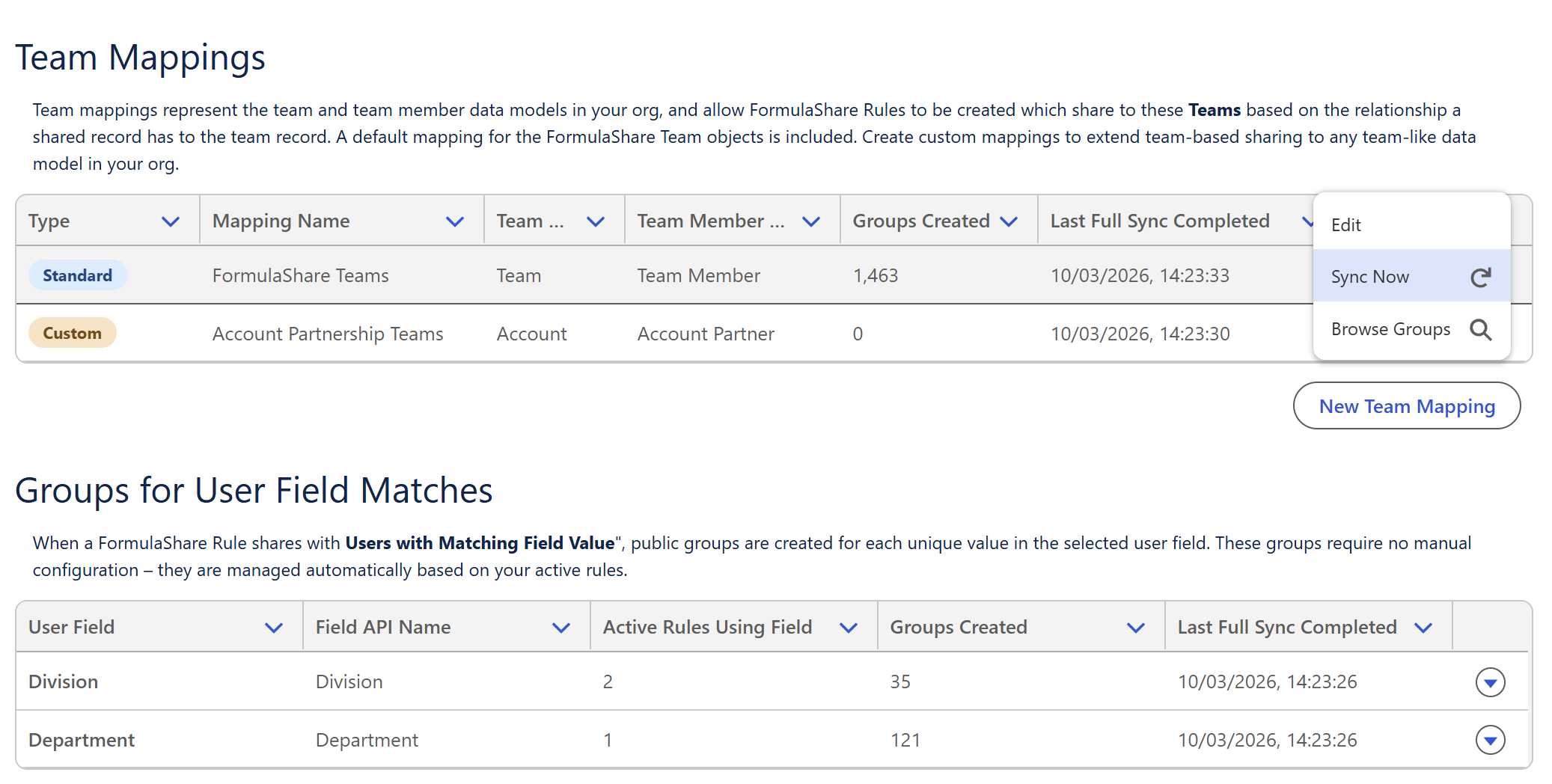
The sync status for each mapping (including last sync time and number of groups) is shown on this page and updates after each reassessment completes.
What Gets Cleaned Up
During reassessment, FormulaShare removes groups which are no longer needed:
- For team groups: Groups whose Developer Name has the mapping's prefix but doesn't correspond to any current team record. This handles deleted teams, renamed teams (when using Team Name suffix), or retired external ID values. Team groups that correspond to a valid team record are always kept, even if the team currently has no members – members may be added later when team member records are created. To prevent groups from being created for records which are not relevant, add a filter condition to the Team object mapping.
- For user field groups: Groups with the
FSUSR_prefix for a field value that is no longer present on any active user. Unlike team groups, user field groups are also removed if no active users currently have the field value, since the group's existence is driven by user data rather than a persistent team record.
Deletion of orphaned groups happens at the end of Phase 1, after all valid groups have been confirmed. This ensures groups are not deleted prematurely if they were temporarily absent from the assessment scope.
Role-Only Mapping Optimisation
When a Team Mapping has a team-level role field configured and no Team Member Object is set, the mapping operates in role-only mode. In this mode, the batch job restricts its team record query to records where the role field is non-null:
SELECT Id, <RoleField> FROM <TeamObject> WHERE <RoleField> != null WITH USER_MODE
This avoids loading team records that have no role value and therefore no role system group to add to the public group. It reduces both heap usage and query rows processed, which can be significant for team objects with large numbers of records where only a subset have a role value.
If a team record's role field is blank, no group will be created for that team record during batch reassessment. If you expect a group to exist, ensure the team record has a non-null value in the configured role field.
Batch Size Configuration
Two FormulaShare Settings control the batch sizes used during reassessment:
- Groups Assessment Batch Size - Controls the batch size for Phase 1 (creating groups). Defaults are managed internally and should not need adjustment in most orgs.
- Groups Population Batch Size - Controls the batch size for Phase 2 (populating group membership). Defaults are managed internally. If you have very large teams or very large numbers of user field values and are experiencing timeout issues, reducing this setting may help.
See App-Wide Settings for how to configure these.
Large Volume Considerations
Team group reassessment uses Salesforce's Database.QueryLocator to process team records in batches, which means it can handle very large team record volumes (well in excess of 50,000 records) without hitting heap limits or query limits.
User field match group reassessment loads all relevant active users into memory. This queries and processes active users with supported license types and populated values in sharing fields and loads this data into memory. In orgs with very large user populations where sharing field values will be used (upwards of around 10,000), this approach may not be practical. Contact Cloud Sundial Support to discuss options or to understand how this might affect usage of this feature.
Related Articles: